
2Simple and Teachmeet

Having taken part in (and organised as skinnyboyevans) some excellent Teachmeet events around the UK, 2Simple is a bona fide supporter of these inspiring events.
Whether it be constructively contributing to micropresentations, sharing first-hand classroom experiences or simply being one of the “enthusiastic lurkers”… you name it, we embrace it.
Error
This video doesn’t exist
Simon Haughton talks about Purple Mash at Teachmeet Black Pool
We are aware that some of you, who organises Teachmeets, may need a little helping hand from time to time. Here are some ways 2Simple can support your event:
2Simple Goodies
We are happy to provide your event with 2Simple goodie bags – what’s inside them? It’s a surprise!
Simply let us know the estimated number of attendees and we’ll make sure that you’ll have enough for the night.
Purple Prize
If you are running a competition on the day, do let us know – if we have a relevant prize, we’d be happy to provide this for you.
Free Trials
You’d also be pleased to know that we offer free trials to schools.
Your attendees may request a 30 day trial to any 2Simple program highlighted on any of the presentations by filling in a request form that we’ll provide you.
Any other ideas on ways we can support your event is welcomed – email mikee@2simple.com or call 0208 203 1781.
Here is Max and I at Teachmeet Game
Posted in Uncategorized
Leave a comment
Learning French through ICT
Thanks to Engagyne Primary School in Havering for making this video on how their pupils have been using 2Simple French. They feel the games, creative screens, whiteboard activities and robot reading has really helped them learn a new langauge while having a lot of fun too.
I think we’ll be looking to Engayne to help us run our French operation and media team in the future.
Games Design in Year Four
I was thrilled to see this video on the VITAL You Tube channel. The video shows Matt Lovegrove from Sonning Common Primary, working with 2DIY to enable his children to become games designers.
Matt’s year four children make learning games for children in year two, giving the children real context for games design. As you watch the video you will see how the children begin to compile a list of criteria for their games and focus on their audience.
Note – if You Tube is blocked in your school – you may want to watch this at home
Regular readers of this blog will know that the idea of designing games for younger learners is a tried and tested project and is very rewarding for both designers and players. See for instance our work with Tim Rylands and two school who collaborated over skype to design and evaluate games.
Why not have a go with your school?
If you don’t have 2DIY in your school why not contact Anthony or Gemma and ask for a 30 Day approval copy.
Thank you to Vital for producing this video and to Matt and his children for his 2DIY enthusiasm and for showcasing the project. You can read more about Matt’s work on his blog.
An Engaging Online Space for Primary Pupils
Thank you to Gary Spracklen, ICT Coordinator at The Prince of Wales first school in Dorchester, for compiling this video on how his school is using Purple Mash.
Logging in shouldn't be difficult
We have been thinking a lot about how children, particularly younger children access Purple Mash. We have also been listening to your feedback on this issue and as a result we will soon bring you 2Login.
I saw this fully for the first time today when Max, our Creative director gave us all a quick demo. I have included his video alongside his explanation notes of 2Login below.
You could share one username & password across the whole school to login into Purple Mash. This is a great way to start using PM. However, as your pupils get more used to working online using Mash you may want them to have their own online space to save their work.
If you already use a Learning Platform we can probably integrate with that. But, if you don’t this means having to give children their own individual username & passwords. This is fine for older pupils, but we understand it can be tricky to get a class of Reception children to login to any site.
We have therefore developed 2Login. It is a simple & secure system to use within the school building.
Pupils simply click on their picture & then type the first letter of their password. 2Login checks it is correct, opens the web browser at the correct page & logs into PM for them.
Pupils can paint their own pics, or use the built-in webcam. All the pics are stored locally on the PC.
2Login will be available from September, & will provide a really simple way to help your younger pupils login to PM
Please add a comment and tell us what you think – we’d love to get your views.
I hope to be trying this with a school on the next couple of days and I’ll let you know how I get on.
Logging in shouldn’t be difficult
We have been thinking a lot about how children, particularly younger children access Purple Mash. We have also been listening to your feedback on this issue and as a result we will soon bring you 2Login.
I saw this fully for the first time today when Max, our Creative director gave us all a quick demo. I have included his video alongside his explanation notes of 2Login below.
You could share one username & password across the whole school to login into Purple Mash. This is a great way to start using PM. However, as your pupils get more used to working online using Mash you may want them to have their own online space to save their work.
If you already use a Learning Platform we can probably integrate with that. But, if you don’t this means having to give children their own individual username & passwords. This is fine for older pupils, but we understand it can be tricky to get a class of Reception children to login to any site.
We have therefore developed 2Login. It is a simple & secure system to use within the school building.
Pupils simply click on their picture & then type the first letter of their password. 2Login checks it is correct, opens the web browser at the correct page & logs into PM for them.
Pupils can paint their own pics, or use the built-in webcam. All the pics are stored locally on the PC.
2Login will be available from September, & will provide a really simple way to help your younger pupils login to PM
Please add a comment and tell us what you think – we’d love to get your views.
I hope to be trying this with a school on the next couple of days and I’ll let you know how I get on.
2DIY Help Sheets
Thank you to Sean Harding and Gideon Williams who shared with me their 2DIY help sheets, created for a course they were running on Games Based Learning.
I have used Scribd to upload them here so that you can quickly see their high quality work. If you would like to download these, you can also use the links below.
Right Click on each and choose ‘Save Target As’
Posted in Uncategorized
Leave a comment
More Publish Projects – So where now?
This week we are adding even more Publish Projects and also asking you for your views on features we could add.
The three new apptivities being added today are as follows (note hyperlinks to each apptivity will be added later)
Roman Invasion News
This would be ideal for work in Year 3 and 4, where your pupils are looking at the popular topic of Invading and Settling. Pupils can use the photographs of coastal scenes and layer images of soldiers and boats on top of these scenes to create the headline picture. To write the front page article there is the usual mix of prompt questions and a well stocked word bank.
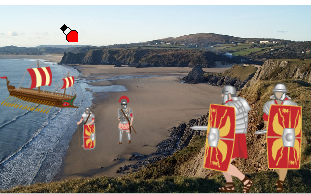
If your class use this Publish Project then do please let me know – I’d love to see some examples.
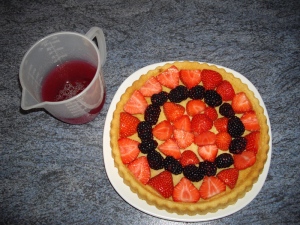
Making a Flan
Another great sequencing activity, where children have to select photographs and describe each of the stages involved in creating a tasty summer treat.
Sports Day
We are certainly in Sports Day season at the moment and schools have been asking us to make an apptivity on this theme. We have listened and here it is, a news report style template complete with athletic clip art and scenes of cheering spectators.

Don’t forget that if you have a license for Purple Mash you can customise these further and unlock enhanced functionality. Licence holders are now able to edit and resize text, so more can be fitted into the columns. They can also change the locked text boxes to something more fitting, so Sports news could become Hendon Primary News. Having a licence also allows you to save and open your work, so that you can continue working on it at a later time.
Here is a short video that explains some of the differences between paid and free uses of Purple Mash
Now you have watched this video and used Publish Projects, please tell us what other features could we add to further enhance the experience for paid users of Purple Mash. What would make these even more versatile?
How else could these tools support you as a teacher to support your learners in the writing process?
Please add your comments in the comment box below.
Posted in Uncategorized
Leave a comment
Purple Mash – What do the Pupils say?
Thank you to Emma Barker, a Year 5 teacher from a school in Huddersfield who asked her pupils to evaluate Purple Mash.
One of her pupils posted their views on the school VLE and Emma kindly posted this on Twitpic. I have taken the liberty of sharing the comments below:





 The 2Simple Blog
